
Free Interactive Learning for Math & Science
Overview
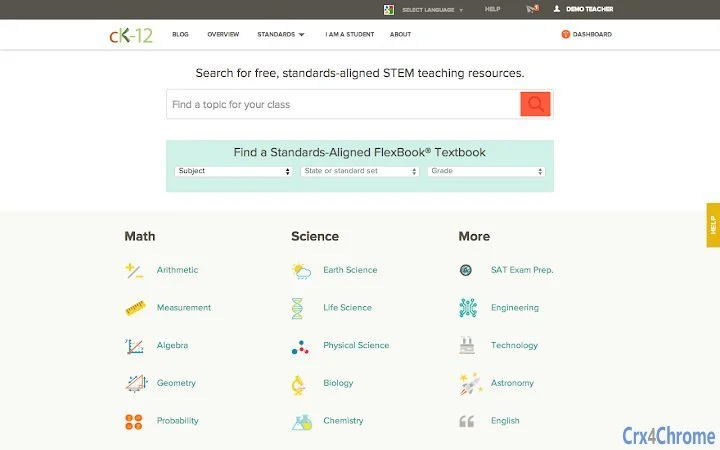
CK-12 Foundation offers a comprehensive desktop application designed to support self-paced learning across a wide range of math and science disciplines. The software enables users to explore over 5,000 concepts through multiple learning modalities, including videos, interactive objects, assessments, flashcards, and digital textbooks. It is aligned with Common Core and State Standards, making it a valuable resource for students, educators, and homeschooling families. The platform supports subjects such as Arithmetic, Algebra, Geometry, Calculus, Biology, Chemistry, Physics, Earth Science, and more, with additional content in SAT Prep, Engineering, and Technology.
Designed for both individual learners and classroom environments, the software allows users to browse, learn, practice, and track progress independently or through managed groups. Educators can assign practice tasks and monitor student performance in real time. The application is part of a larger ecosystem that includes a web-based platform, with all content available at no cost. The developer, CK-12 Foundation, is a non-profit organization focused on creating accessible, high-quality STEM education materials globally.
Real-world usage scenarios include supplemental study for high school and college students, classroom instruction, teacher-led lesson planning, and independent exam preparation. The software’s modular design supports flexible learning paths, allowing users to focus on specific topics or follow structured curricula.
Key Features & Capabilities
- 5,000+ Concepts Across STEM Fields – Users can access a vast library of math and science topics, from foundational arithmetic to advanced calculus and physics, with content tailored to various academic levels.
- Multi-Modal Learning Tools – Each concept is presented through videos, interactive simulations, text explanations, quizzes, and flashcards, enabling diverse learning styles to engage effectively.
- Standards-Aligned Curriculum – Content is mapped to Common Core and State Standards, ensuring educational relevance and alignment with formal academic frameworks.
- Classroom Management Tools – Educators can create and manage student groups, assign practice exercises, and monitor individual and group progress through a centralized dashboard.
- Free Access to All Content – The software and its entire content library are available at no cost, with no hidden fees or subscription requirements.
These features support a dynamic learning experience, whether used for personal review, classroom instruction, or test preparation. For example, a high school student preparing for the SAT can use the exam prep modules with interactive quizzes and video explanations. A teacher can assign a set of geometry problems with embedded simulations to reinforce spatial reasoning. The integration of assessment tools allows immediate feedback, helping users identify knowledge gaps and improve retention.
User Interface, Workflow & Performance
The user interface is structured to prioritize accessibility and ease of navigation. A clean, intuitive layout allows users to browse subjects by category, search for specific concepts, and access learning materials with minimal clicks. The workflow is linear and consistent across all modules, reducing cognitive load and enabling users to transition smoothly between videos, quizzes, and interactive tools.
Navigation is supported through a sidebar menu, search bar, and progress tracking indicators. Users can save their learning path, bookmark concepts, and return to incomplete sessions. The application integrates with the web platform, allowing seamless continuity between desktop and browser use.
Performance observations are based on general software behavior patterns. The developer did not specify resource usage details. No reported issues with stability or responsiveness were noted in the provided documentation. The application runs on multiple operating systems and maintains consistent functionality across environments. CPU and RAM behavior were not specified, but the 150 MB installation size suggests moderate system impact.
Compatibility & System Requirements
The software is compatible with Windows, Mac, and Linux operating systems. It is available in version 1.0.0 and has an installation size of 150 MB. The developer did not specify additional hardware requirements such as minimum RAM, processor speed, or GPU capabilities.
Platform compatibility information is limited to the listed operating systems. No specific versions of Windows, macOS, or Linux are mentioned. Users should ensure their system meets general desktop application requirements for smooth operation. Exact system requirements were not listed. The software is designed to function on standard desktop environments without specialized hardware.
Pros and Cons
Pros
- Over 5,000 free math and science concepts with diverse learning formats
- Aligned with Common Core and State Standards for academic credibility
- Classroom management tools for educators and group assignments
- Available at no cost with no subscription or hidden fees
- Supports multiple operating systems including Windows, Mac, and Linux
Cons
- Exact system requirements were not specified
- Performance details such as CPU or RAM usage were not provided
- No information on offline functionality or data synchronization
- Limited developer background beyond the non-profit status
- Dependency on internet access for full functionality (inferred from web integration)
FAQ Section
Is the software free to use?
Yes, the software is completely free. All content, features, and tools are available at no cost with no subscription or hidden fees.
Which operating systems does it support?
The software is compatible with Windows, Mac, and Linux operating systems.
Is there an offline mode available?
Information about offline functionality was not provided. The software may require an internet connection for full access to content and features.
How often is the content updated?
Updates are managed through the CK-12 Foundation’s ongoing content development cycle. The release date of this version is April 15, 2023.
Can I use this software for classroom teaching?
Yes, educators can create student groups, assign practice tasks, and track progress, making it suitable for classroom instruction and remote learning environments.
Final Thoughts
CK-12 Foundation’s desktop application delivers a powerful, free learning experience for students and educators across math and science disciplines. With over 5,000 concepts available through interactive videos, quizzes, and simulations, it supports diverse learning styles and academic needs. The integration of classroom management tools adds value for teachers, while the free access model ensures broad accessibility. Although specific system requirements and performance data are not detailed, the application’s compatibility with major operating systems and low installation size suggest broad usability.
For students seeking supplemental study materials, educators designing lesson plans, or homeschooling parents, this tool offers a robust, standards-aligned platform. Its multi-modal approach enhances comprehension and retention, making it a standout choice in the education software space.
Download CK-12 Foundation now







